These techniques help reduce the number of test cases while still finding defects.
1. Equivalence Partitioning
Instead of testing every possible input, inputs are grouped into categories that behave the same.
You test one value from each group.
Example:
If a field accepts numbers between 10,000 and 99,999:
- Below 10,000 → invalid
- Between 10,000–99,999 → valid
- Above 99,999 → invalid
Testing one value from each group is usually enough.
2. Boundary Value Analysis
Focuses on values at the edges of allowed ranges.
Bugs often occur at boundaries.
Example:
If the max value is 99,999:
- Test 99,998
- Test 99,999
- Test 100,000
3. Decision Table Testing
Used when complex business rules determine outcomes.
- Inputs (conditions) are listed
- Expected actions/results are mapped
- Each rule becomes a test case
This helps ensure no combinations are missed.
Example:
Decision Table based on possible outcomes when a player lands on a property in the game of Monopoly:
| Rule 1 | Rule 2 | Rule 3 | |
| Conditions | |||
| Player lands on a property owned by another player | Yes | Yes | No |
| Player has enough money to pay rent | Yes | No | N/A |
| Actions | |||
| Player stays in the game | Yes | No | Yes |
Resulting test cases:
| Test Case | Execution Step | Acceptance Criteria |
| 1 | Player lands on a property owned by another player and has enough money to pay rent | Player stays in the game |
| 2 | Player lands on a property owned by another player and does not have enough money to pay rent | Player does not stay in the game |
| 3 | Player lands on a property which is either not owned or is owned by the player | Player stays in the game |
4. Pairwise Testing
Used when many fields or options exist.
Instead of testing every possible combination, this technique ensures:
- Every pair of inputs is tested at least once
This catches most real-world defects with far fewer tests.
Example:
An application with a list box containing 10 elements (a,b,c,d,e,f,g,h,i,j), a text box that allows numeric entry of values from 1 to 100 and a checkbox:
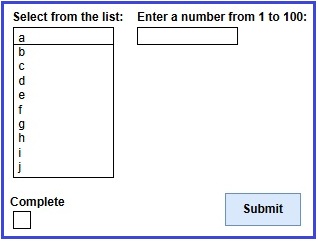
The following pairwise table would be used to identify the needed test cases:
| Text Box | List Box | Check Box |
| Valid Integer | In set | Checked |
| Valid Integer | In set | Unchecked |
| Valid Integer | Not in set | Checked |
| Valid Integer | Not in set | Unchecked |
| Invalid Integer | In set | Checked |
| Invalid Integer | In set | Unchecked |
| Invalid Integer | Not in set | Checked |
| Invalid Integer | Not in set | Unchecked |
| Alpha character | In set | Checked |
| Alpha character | In set | Unchecked |
| Alpha character | Not in set | Checked |
| Alpha character | Not in set | Unchecked |
| Special character/symbol | In set | Checked |
| Special character/symbol | In set | Unchecked |
| Special character/symbol | Not in set | Checked |
| Special character/symbol | Not in set | Unchecked |
| Blank | In set | Checked |
| Blank | In set | Unchecked |
| Blank | Not in set | Checked |
| Blank | Not in set | Unchecked |