New AI Tool DeepSeek and What You Need to Know

New AI Tool DeepSeek and What You Need to Know

What’s new?
DeepSeek refers to a new set of frontier AI models.
DeepSeek is not a University-approved AI tool.
It was recently reported that a vulnerability in DeepSeek’s website left data exposed, including user chats.

👥 Who is affected?
We advise that end users (students, staff and faculty) avoid using deepseek.com or DeepSeek’s mobile app.
Developers or researchers interested in experimenting with the AI model itself, contact AI Enablement for information on how to access DeepSeek securely.
Do not build Deepseek’s open source model into production services.

❗Why it matters:
This new tool is receiving a lot of media attention, and is causing disruption in the AI space.

🐋 Go deeper:
For more about DeepSeek and its implications for the AI landscape, read DeepSeek Explained at ai.nd.edu. You can learn more about approved AI tools for campus at AI@ND.

For 24/7 self-service assistance including the virtual agent, go to servicenow.nd.edu or contact the Service Desk during business hours at 574-631-8111 or oithelp@nd.edu.

University of Notre Dame
Office of Information Technology

Business Objects 4.3 Upgrade

The issues that were encountered during OIT’s attempt to upgrade Business Objects back at the beginning of October have been resolved. This weekend, OIT will proceed with the upgrade to Business Objects version 4.3 which contains major changes to the user interface. To assist with the transition, we are offering the following learning opportunities. 

All Users
Business Objects Upgrade ResourcesBusiness Objects 4.3 Quick Reference Guide

Business Objects 4.3 Overview Video
Tech Talk Live Wednesday, December 11th at 1:30pmTech Talk Live Zoom Link

Business Objects Upgrade Status

OIT has decided to roll back the Business Objects upgrade from this weekend due to issues with user access. Business Objects will be restored to the backups created just before Saturday’s upgrade. Any modifications made to reports or schedules since Saturday will need to be reapplied. The restoration process has started and is expected to take several hours to complete, during which Business Objects will remain offline.

Please note that reports scheduled to run between Saturday morning and today may rerun, resulting in duplicate reports this morning. You can ignore these duplicates.

Additionally, today’s Office Hours at 3:00pm and Wednesday’s Tech Talk Live at 1:30pm will be postponed.

Business Objects & Tableau Updates

OIT Maintenance/Updates – Business Objects & Tableau 

On October 5th, the Office of Information Technologies will be performing maintenance on both Business Objects and Tableau.  Business Objects will be upgraded to version 4.3 and will have a significantly new look and feel, designed to simplify navigation and introduce additional features. The Tableau server will be upgraded to the latest version (2024.4.2) and will address several bugs which have been identified.

Look for more information on the Business Objects Upgrade and the new user interface next week.

Farewell to Caiti Houlihan

Dear Colleagues and Friends,
 
I write to share the bittersweet news that Caiti Houlihan has accepted a great opportunity elsewhere at the University.  Starting September 9, she will assume the role of Advisor to the Vice President of Undergraduate Enrollment.  
 
During her two years in Development, Caiti has been an invaluable member of the Academic Advancement team and a great collaborator across the Department, as evidenced by her 2023 “Most Valuable Partner” CGA.  
 
While I will miss working closely with Caiti, I am excited that her many talents will continue to advance the mission of Notre Dame, which she loves dearly, in this next opportunity.
 
Please join me in congratulating Caiti as she begins her new role!
 
Sincerely,
Matt Gelchion

Farewell to Grace Prosniewski

Dear Team, 

I am writing to share the bittersweet news that Grace Prosniewski will be leaving Development on Tuesday, August 13th. Grace has been an integral part of our overall University Relations team for the past eight years, contributing greatly in her time as a Writer for the Storytelling & Engagement team, and currently as Program Director of Internal Engagement. 

Her work product stretches far and wide, keeping us up to date with Internal Communications, facilitating dialogue and community through the ND Shares series, and inspiring fun in our workday with cookie exchanges, interest groups, and the UR annual tradition of Spooktacular. Her dedication, expertise, and positive attitude have made a lasting impact on all of us. While we are sad to see Grace go, we are also excited for her as she pursues a new journey as Director of Storytelling & Strategic Initiatives in NDHR!

Please join me in thanking Grace for modeling all of the values we have in University Relations, and wishing her success and happiness in this new chapter. Thank you, Grace, for everything you have done for us. Stay Golden!

Best regards, 

James Riley

asceND is getting an upgrade!

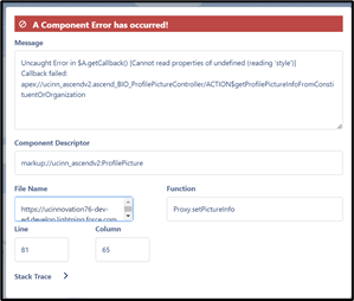
This Monday, the Development Information Technology and Services team will perform an upgrade to asceND.  The V6.26 upgrade should be completed by 8:00 a.m. and will include updates to correct the Profile Picture error (shown below) and gift processing components.


We ask that if you experience any issues prior to that time, please access the system again when the upgrade process is finished.  

Thank you for your patience and support.  

asceND update – Fundraiser Homepages

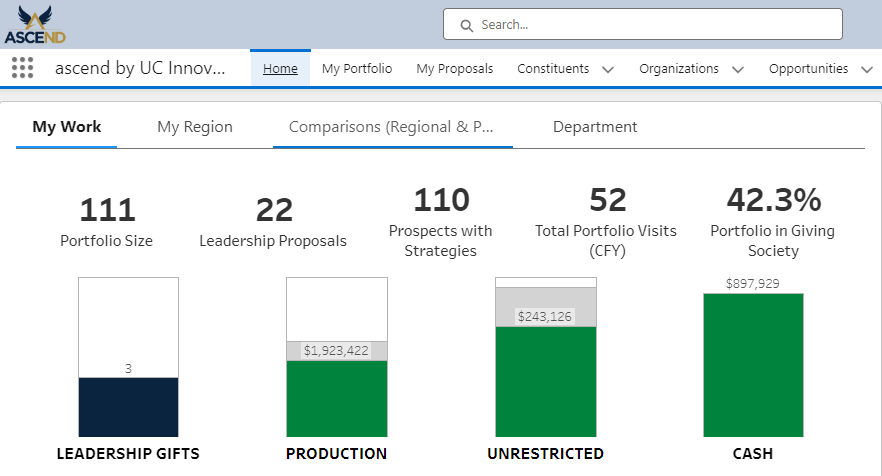
As of last week, certain visualizations on the fundraiser homepages have been updated with the latest reporting data from asceND. It will be updated daily with current data from the system providing an up-to-date view of their progress towards their goals. 

From their home page, under “My Work” they will now see the bar chart is up-to-date with their progress to goals, ie. production, unrestricted, etc. (No more message about frozen as of 1/10/24)

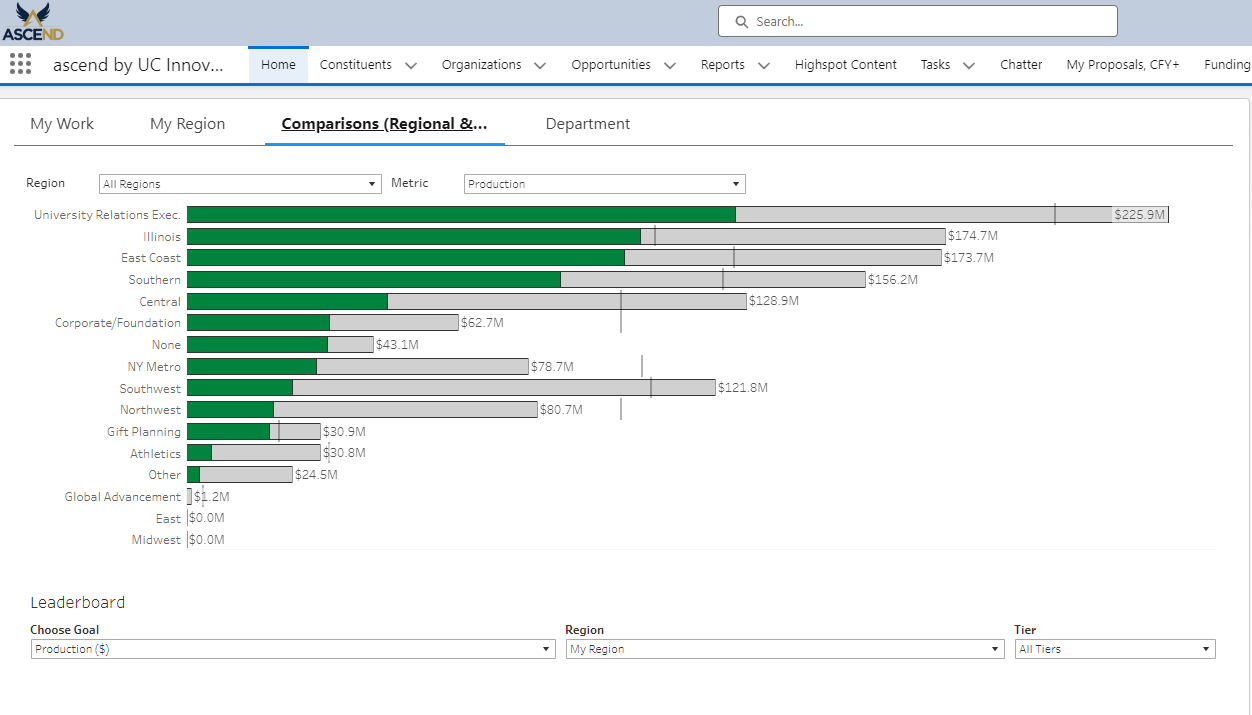
From the “Comparisons” tab on the homepage, the Metrics and Leaderboards have been updated as well.

One item to note is that while this information has been updated in asceND, the data on the fundraiser dashboard is still from January 10.  We will continue to work on the dashboards and visualizations and keep you posted as more are released.

asceND Component Error Message

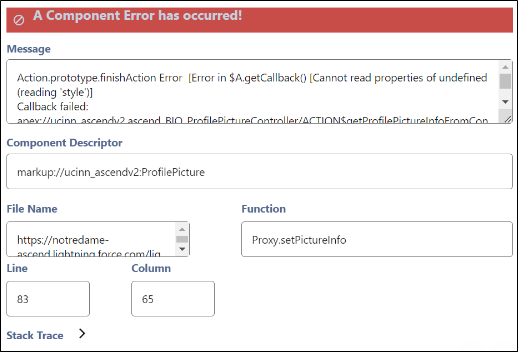
Many users have reported seeing the following message when accessing records in asceND. Please know that the Development IT&S team is aware of the error and is currently working with our partners at UCI to rectify the issue.  They have informed us that the issue will be resolved in the next software update.

Until then, you may close the message and continue using the system.

Cell service issues at ESC

Cellular signal strength has been an issue at Eddy Street from day one because the building is a large metal box that blocks signals. Plus, the interior rooms and offices have floor-to-ceiling metal walls which further block the signal.

To improve your cellular calling experience, it is strongly recommended to enable WiFi Calling on your mobile phone. This will allow your phone to utilize the eduroam wireless (and even your home wifi if you have bad cell coverage there) and should help with all calls from your phone. Please use these instructions from the OIT on how to turn on WiFi calling for both iPhone and Android phones.

WiFi Calling Instructions

University to Delete Inactive Google & Box Accounts

Beginning in March 2024, all content from more than 34,000 inactive Google & Box accounts will be deleted. This may affect files shared with you from those accounts.

Google Drive: Find at-risk files now

Everyone will now be able to EASILY search their Google Drive for files at risk of being deleted.

In addition, a red label will be added to all native Google Apps files owned by an account pending deletion per the Account Lifecycle Process.

You can use the new Label field in Advance Search to automatically display a list of all files shared with you that are owned by accounts pending deletion.

Reminder – asceND Conversion!!

As a reminder, today, starting at 5:00 pm crmND access will no longer be available and the Advance system and BEAT will become available as READ ONLY. No gift processing or data inputs (ie contact updates, proposals, contact reports, BEAT Ticket Requests, etc.) will be allowed during the data conversion.

The asceND team will perform a variety of planned activities through 8:00 am (ET) Tuesday, January 16 to migrate and deploy the new Salesforce asceND Platform.  If you are connected to the Advance system at 5:00, your session will automatically be terminated, and you will need to log back in if needed to access information.

If you have any questions or concerns, please contact our departmental IT support team.

asceND Conversion Begins Jan 10 @ 5:00 PM

At 5:00 pm on Wednesday, January 10, crmND will no longer be available as part of the transition to asceND and the Advance system and BEAT will become READ ONLY.

The data conversion to asceND will begin at that time and we expect asceND will be operable on Tuesday, January 16. No gift processing or data inputs (ie contact updates, proposals, contact reports, etc.) will be allowed during the data conversion. 

The data mart will be frozen and available on 1/11 for reporting with data processed through 1/10.

If you have any questions or concerns, please contact our departmental IT support team.

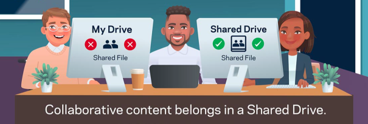
Deletion Risk: Locate Shared Files and Move to Shared Drives

Protect Your Collaborative Content in Google & Box

Attend an information session to understand the changes occurring with the Google and Box accounts of those who left the University and why this has an impact on you!

In these informative sessions, you will gain insights to:

  • Reasons why is this happening
  • Implications of when accounts are deleted
  • How this directly affects you
  • Timeline of when accounts will be deleted
  • What you need to do about it now

Also included will be a short demonstration on how to:

  • Search for files shared with you in Google
  • Identify if a file or folder needs to be moved into a Shared drive
  • Create a Google Shared drive & move files/folders to the shared drive
  • Access more training resources

We strongly encourage you to sign up for one of the zoom sessions listed below. 

Please be aware that the Google & Box Information Sessions will not be available from December 20, 2023, to January 5, 2024. Additional information sessions coming in January 2024.

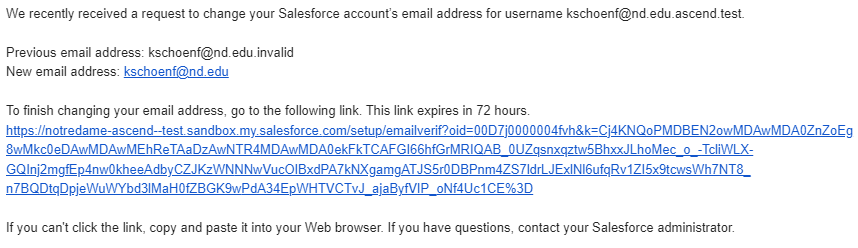
asceND Training & Sandbox Messages

Link

Team,

As you know, training for asceND has begun.  Every user will have his/her asceND account activated in our Test/Sandbox environment prior to their training session.  During this time, you may receive the following.

  • A message similar to the one shown below. Please review and approve before training so that your account will be in sync with OKTA.


  • Emails from asceND Test with the subject beginning with the word “SANDBOX” notifying you of a deceased individual, an approved assignment/research request, etc. These are TEST MESSAGES only. No action should be taken on these messages. 

Please reach out to Carleen Quinlan if you have any questions. 

asceND Canvas Training

Team,

In preparation for the transition to asceND Go-Live scheduled for October 23, 2023, we have compiled a few helpful training items that you may review prior to your registered training session. These have been placed in Canvas (the University’s Learning Management System) as part of a course that will ultimately convert into the training criteria for new hires. 

For those gaining access to asceND, you should have received an email stating that you’ve been invited to participate in the course (called asceND).  All you need to do is click on the “Get Started” link and you will be directed to the homepage and available Modules. Feel free to browse through pages to learn how to personalize your profile and navigation bar, execute searches and learn about terminology and data management.

We look forward to sharing more at the upcoming training sessions starting September 25th. If you don’t have a training time on your calendar yet, you will soon!

Get ready to asceND! 


Thank you from Casey Buck

Colleagues,

It is with a heavy heart that today is my last day. The last year at the University of Notre Dame has been wonderful. This place helped me find my passion at a time when I was lost in my career, get through hardships, and develop deep rooted values to be the greater force for good. Therefore, I am forever grateful for this place. However, after a little over a year of being a development coordinator (which taught me so much), it is time for me to take the next step in a direct fundraising role at Purdue University. That being said, I would not have been able to achieve this without each and every one of you. You all have helped develop me as a young professional and I just want to say thank you.

God Bless,
Casey Buck

Google First Wizarding College


Join the Google First Wizarding College

The Office of Information Technologies (OIT) has launched a new initiative to improve campus awareness and expand use of all the various Google tools at our disposal. To this end, they have designed the Google First Wizarding College – a fun, educational game designed to promote and teach the use of Google collaboration tools such as Docs, Sheets, Slides, and Chat.

The program is intended for staff and faculty, is self-guided, and takes 30-60 minutes per level to complete. The first level opens January 18 and the program continues through the spring semester. There are wizard prizes for each level, too!

Learn more or sign up for the Google First Wizarding College at https://go.nd.edu/googlefirst/

For 24/7 self-service assistance including the virtual agent, go to: servicenow.nd.edu, or contact the OIT Help Desk during business hours at 574-631-8111 or oithelp@nd.edu.

Condolences to Wayne Harpenau

We offer our deepest condolences to Wayne Harpenau upon the passing of his mother-in-law Mildred “Millie” Haag, last Friday, December 17th.

The full obituary may be found here.

Please remember to keep Wayne and his wife Julie and their entire family in your prayers.

– The IT&S Team

Announcing…asceND

Have you heard the news?…..We’re moving to asceND.


What is asceND?….It’s the most comprehensive advancement and constituent engagement solution in higher ed. 


Why are we asceNDing?…click on the image to learn why.


We’re very excited about this opportunity to implement a system that:

  1. Modernizes the user experience
  2. Provides an integrated solution to help break down data silos
  3. Drives fundraising productivity
  4. Builds personal engagements
  5. Streamlines operations to maximize efficiency and effectiveness
  6. Has the ability to be agile in supporting changing business needs
  7. Provides a roadmap of future direction for continued growth


What will asceND do?

asceND will have the processes Advance Web, crmND, BEAT, and various reporting tools have and replace them. There will also be integrations with Tableau and other tools we are using to create a more seamless experience.

Look for project updates to appear in the weekly souNDoff newsletter, Tech Talk Live and Zoom product demonstrations. 

If you have any questions feel free to reach out to any asceNDers team member. 

OIT Happenings

New Zoom Recordings Retention Plan Begins 1-18-21

OIT Zoom administrators will be implementing a new Zoom recordings retention plan on Monday, January 18, 2021.

Beginning on this date, any recording more than 365 days old stored in the Zoom cloud (zoom.nd.edu) will be deleted. This is an ongoing process and each day, any recording over 365 days old will also be deleted. Any recordings that need to be saved must be manually moved to Panopto before the scheduled deletion date in order to retain them. Instructions for moving recordings to Panopto are available in this knowledge article. Local recordings will not be affected.

Two New Features in Google Sheets

Google has added two new features in Sheets. These features will help you prepare and analyze data more easily.
Cleanup suggestions: Helps to ensure your data is accurate by identifying and suggesting fixes for common data errors.
Column stats: Provides automated insights about the values within a column so you can identify outliers and quickly get a sense of what your data looks like.

Additional details are available in this Google Workspace Updates article.

Using a Group for Sharing in Qualtrics

The best way to share the items you create for your Qualtrics Form is through a Group.
Survey items such as emails, end of survey messages, error messages, files, images and contact lists can be shared when you create them within the Group. You can also share surveys with a Group, but the Group must be owned by an individual.
To create a Group, or manage your Group’s membership, contact the OIT Help Desk. For a new Group, provide the name for your Group, or to add/remove names from the initial membership list, provide the full name and email of each individual.
More information about a Group in Qualtrics is available in this knowledge article.

New Time-Out for Tech Sessions Begin

Do you need a convenient and easy way to keep up with changing technology? If so, check out OIT’s Time-Out for Tech sessions this spring. Each of these 30-minute Zoom sessions focuses on a topic about an application or IT service you may use or want to learn more about. They are packed with great information, how tos and best practice tips to help build your skills.

Find out more about these new Time-Out for Tech sessions this spring in this OIT news article.

Welcome Dr. Colleen Cross to Foundation Relations

Please join me in welcoming Dr. Colleen Cross to the Foundation Relations team as our Mellon Foundation Postdoctoral Associate this year. Colleen served FR previously in the role of Graduate Fellow before earning her Ph.D. this July from Notre Dame in Theology and Peace Studies. Colleen additionally holds an M.T.S. in Systematic Theology from Notre Dame and a B.A. in Religious Studies and Classics from the University of Arizona. She brings her expertise and energy to the FR team, supporting our proposal development and foundation engagement efforts to secure funding for Notre Dame’s research and scholarship. In this new virtual environment, I have encouraged Colleen to reach out to UR colleagues by email to meet some of you and learn about your work. Thank you in advance for connecting with Colleen as she spends her year with FR.


Sincerely,

Michelle Joyce

Senior Director, Foundation Relations

Cute Adoptable Kittens


Hello UR fam,

A friend and former Development colleague of mine, Anna Bradley, has been fostering two stray kittens for the past couple of weeks and wants to find them a good home. They are 10 weeks old. These cute little fellas are both sweet and in good health. If you are interested in adopting one or both of them, please reach out to me directly and I will put you in touch.

Best, Shelby
(626) 808-7921

Technology News – Google and Zoom Updates

Google Updates – OIT Lunch & Learn (online session)

Google is changing things up again! Learn about the latest features Google has added to its G Suite products – multiple signature templates in Gmail, dashboard and drive shortcuts, the redesigned file and the folder sharing interface in Google Drive.


Register at endeavor.nd.edu or email training@nd.edu.
Tuesday, June 23; noon to 1 p.m.

Zoom Updates – Meeting Passwords

In anticipation of Zoom requiring meeting passwords, Zoom meetings will have passwords on by default starting June 13, 2020.

Key details about Zoom meeting passwords:

  • Only new meetings will be affected
  • Meeting passwords will be automatically added to the invitation when you schedule the meeting and embedded securely in the URL of the meeting
  • Meeting passwords will, by default, be a minimum of six numbers
  • If your meeting participants click on the meeting URL in the invitation or in the meeting list in their Zoom client, they will be able to join without entering a password
  • If your meeting participants join by dialing in with a telephone, by clicking the Join button on their client, or by going to join.zoom.us, then they will have to enter the meeting password
  • For more details, see Zoom’s knowledge article on meeting passwords

To see an example of how required passwords will look, see the Zoom Passwords and Scheduling a Meeting article.

Entering and Exiting Grace and Flanner Halls

We, Risk Management & Safety, Maintenance, and Building Services, are implementing a change to the Grace and Flanner Halls’ dock areas. Currently, the exterior doors leading into the dock are open during normal business hours while the interior doors always remain open. Effective June 5, 2020, access to the dock areas will be restricted at all times.

While we realize that many people have historically used the dock as an entrance/exit, these areas were not intended to be used in this manner. Rather, the docks were designed to allow service organizations an unimpeded area to conduct tasks such as making deliveries and removing trash. Trucks making deliveries and pickups at the docks throughout the day pose hazards to foot traffic. Unrestricted access has also, at many times, resulted in the docks being improperly used as equipment, trash, or unwanted item storage area. The resulting clutter creates unsafe conditions for both those working there and those using the areas as a pathway to the building.

We understand that this change may feel inconvenient, but our employees’ safety remains our utmost concern and we appreciate your support.

Thank you,

Mary Beth Greendonner
Associate Director, Risk Management & Safety


Zoom Screen Sharing Security

As using Zoom for meetings has become the norm, we’ve encountered new and interesting features and quirks.  One of those is a security setting that cannot be edited until the initiator of the meeting is signed into the system and assigned as host. Once this occurs, screen sharing and session recording are made available. To learn more about this feature, click here.


Remote Connectivity

During this time, many of us are being introduced to new remote communication tools to stay connected with our colleagues and teams. While all the channels and messaging about them may seem a bit overwhelming, we’ve created a matrix to explain what to use and when. Within the chart are links to training videos, feature descriptions and of course, Zoom virtual backgrounds.

While working with your teams you can store, share, and access team resources from anywhere in the world. This G Suite training video explains how.

In addition, the Office of Information Technologies has provided documentation on using technology to help us work remotely and is offering the following classes this month.

OIT Lunch & Learn: Tools for Working from Home

  • Wednesday, April 8, noon to 1 PM
  • Wednesday, April 15, noon to 1 PM

You can register via Endeavor.nd.edu or contact OIT Training at 631-7227 or training@nd.edu.

Registrants will receive Zoom login information the day before the session.

Remember…if you need assistance you may contact the OIT help desk at 631-8111 or at the ServiceNow portal.


Congratulations to Jennifer Koebel!

Colleagues,

I am happy to announce Jennifer Koebel has accepted the role of Development Associate in Gift Planning.

Jennifer began her career at Notre Dame in December 2007 working for The American Midland Naturalist in Galvin Life Sciences and joined the Gift Planning team as an administrative assistant in October 2012.

We are thrilled to have Jennifer in this new position. Please join me in congratulating Jennifer!

Best regards,

Rich Naponelli

Welcome Ken Heckel!

Dear Colleagues,


I am excited to announce that Ken Heckel is joining the East Coast Region as a Regional Director serving the VA/DC market.

Ken and his wife Jennifer both received their BBA from Notre Dame in 1996, majoring in Finance and Marketing respectively. Ken has over 20 years of experience as an educator, administrator, financial manager, and academic researcher. Most recently Ken served as the Director of Academy Advancement at the United States Military Academy at West Point, and a Lieutenant Colonel in the U. S. Army with nearly 23 years of active duty service. Ken received his MBA from the University of Virginia’s Darden Graduate School of Business and he’s pursuing an EdD in Higher Education Administration at Northeastern University.


Ken and his wife, Jennifer, have two children Olivia and Elias. Please join me in thanking Ken for his service and welcoming him and his family back home to Notre Dame.

George West